> ## Documentation Index
> Fetch the complete documentation index at: https://docs-staging-chore-management-api-autoupdate.mintlify.site/llms.txt
> Use this file to discover all available pages before exploring further.
# Auth0 Database Connections
> Learn how to create and use a database connection using either the Auth0 user store or your own user store.
Auth0 provides database connections to authenticate users with an identifier (email, username, or phone number) and password or [passkeys](/docs/authenticate/database-connections/passkeys/configure-passkey-policy). These credentials are securely stored in the Auth0 user store or in your own database.
You can create a new database connection and manage existing ones at [Auth0 Dashboard > Authentication > Database](https://manage.auth0.com/#/connections/database).
## Database options
### Use Auth0 user store
Auth0 provides the database infrastructure to store your users by default. This scenario provides the best performance for the authentication process since all data is stored in Auth0.
The Auth0-hosted database is highly secure. Passwords are never stored or logged in plain text but are hashed with **bcrypt**. Varying levels of password security requirements can also be enforced. To learn more, read [Password Strength in Auth0 Database Connections](/docs/authenticate/database-connections/password-strength).
For database connections, Auth0 limits the number of repeat login attempts per user and IP address. To learn more, read [Database login limits](/docs/troubleshoot/customer-support/operational-policies/rate-limit-policy#database-login-limits).
To use Auth0's database infrastructure as your user store, you have options to migrate your users to Auth0. The [automatic migration](/docs/manage-users/user-migration/configure-automatic-migration-from-your-database) feature adds your users to the Auth0 database one-at-a-time as each logs in and avoids asking your users to reset their passwords all at the same time. Or, use Management API to create a job to [import users](/docs/manage-users/user-migration/bulk-user-imports). To learn more, read [User Migration Scenarios](/docs/manage-users/user-migration/user-migration-scenarios) for migration examples.
### Use your own database
If you have an existing user store, or wish to store user credentials on your own server, Auth0 enables you to connect to a [custom database](/docs/authenticate/database-connections/custom-db) or repository and use it as the identity provider.
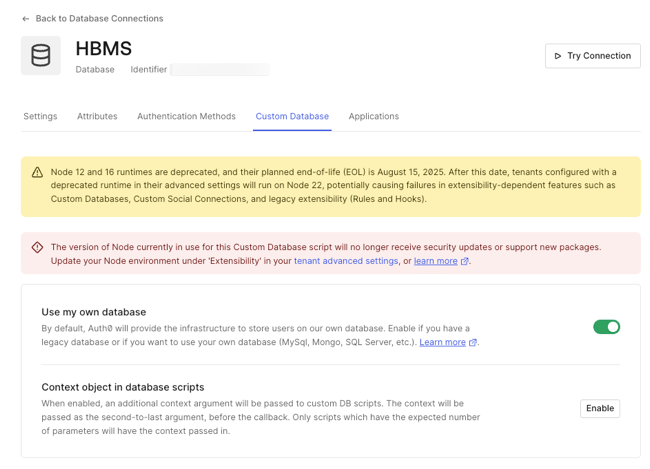 In this scenario, you provide the login script to authenticate the user that will execute each time a user attempts to log in. Optionally, you can [create scripts](/docs/authenticate/database-connections/custom-db/templates) for sign-up, email verification, password reset, and delete user functionality.
The scripts are Node.js code. Auth0 provides [templates](/docs/authenticate/database-connections/custom-db/templates) for most common databases, such as ASP.NET Membership Provider, MongoDB, MySQL, PostgreSQL, SQL Server, Windows Azure SQL Database, and for a web service accessed by Basic Auth. Essentially, you can connect to almost any kind of database or web service with a custom script.
In this scenario, you provide the login script to authenticate the user that will execute each time a user attempts to log in. Optionally, you can [create scripts](/docs/authenticate/database-connections/custom-db/templates) for sign-up, email verification, password reset, and delete user functionality.
The scripts are Node.js code. Auth0 provides [templates](/docs/authenticate/database-connections/custom-db/templates) for most common databases, such as ASP.NET Membership Provider, MongoDB, MySQL, PostgreSQL, SQL Server, Windows Azure SQL Database, and for a web service accessed by Basic Auth. Essentially, you can connect to almost any kind of database or web service with a custom script.