> ## Documentation Index
> Fetch the complete documentation index at: https://docs-staging-chore-management-api-autoupdate.mintlify.site/llms.txt
> Use this file to discover all available pages before exploring further.

> Learn how to configure your HTTP Vault Connections to authorize HTTP requests to external APIs or services.

# HTTP Vault Connection

## Configure your HTTP Vault Connection Options

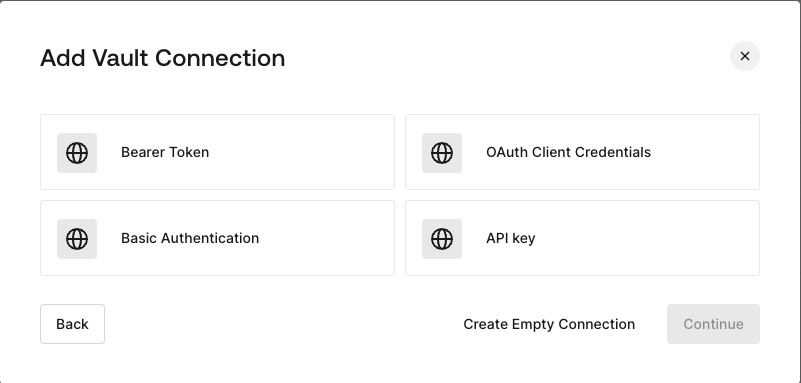
HTTP Vault Connection can be configure with different authentication options and then be used at your HTTP Request Flow Actions.
<Frame>
  <img src="https://mintcdn.com/docs-staging-chore-management-api-autoupdate/CHcdW8myicgKbZ7q/docs/images/customize/forms/vaults/http-vault-connection-options.png?fit=max&auto=format&n=CHcdW8myicgKbZ7q&q=85&s=68af6cde4d62cb03fd752d30cb877021" alt="Dashboard > Actions > Forms > Vault > HTTP" data-og-width="801" width="801" data-og-height="383" height="383" data-path="docs/images/customize/forms/vaults/http-vault-connection-options.png" data-optimize="true" data-opv="3" srcset="https://mintcdn.com/docs-staging-chore-management-api-autoupdate/CHcdW8myicgKbZ7q/docs/images/customize/forms/vaults/http-vault-connection-options.png?w=280&fit=max&auto=format&n=CHcdW8myicgKbZ7q&q=85&s=f6733a071e411874ea37ffce2316547c 280w, https://mintcdn.com/docs-staging-chore-management-api-autoupdate/CHcdW8myicgKbZ7q/docs/images/customize/forms/vaults/http-vault-connection-options.png?w=560&fit=max&auto=format&n=CHcdW8myicgKbZ7q&q=85&s=458931986a4b49c6d5e14aff7ef1e5b0 560w, https://mintcdn.com/docs-staging-chore-management-api-autoupdate/CHcdW8myicgKbZ7q/docs/images/customize/forms/vaults/http-vault-connection-options.png?w=840&fit=max&auto=format&n=CHcdW8myicgKbZ7q&q=85&s=6aea6cdef4c976667312afbfbd1d9f4e 840w, https://mintcdn.com/docs-staging-chore-management-api-autoupdate/CHcdW8myicgKbZ7q/docs/images/customize/forms/vaults/http-vault-connection-options.png?w=1100&fit=max&auto=format&n=CHcdW8myicgKbZ7q&q=85&s=7e394f84688bc923d59546befbc6f486 1100w, https://mintcdn.com/docs-staging-chore-management-api-autoupdate/CHcdW8myicgKbZ7q/docs/images/customize/forms/vaults/http-vault-connection-options.png?w=1650&fit=max&auto=format&n=CHcdW8myicgKbZ7q&q=85&s=c8ff9b4bb76bba95d68ab64bb3874c0c 1650w, https://mintcdn.com/docs-staging-chore-management-api-autoupdate/CHcdW8myicgKbZ7q/docs/images/customize/forms/vaults/http-vault-connection-options.png?w=2500&fit=max&auto=format&n=CHcdW8myicgKbZ7q&q=85&s=c742410b0d4d39e6ba5811c7df2a3cf3 2500w" />
</Frame>

## Configure your HTTP Vault Connection for Bearer Token

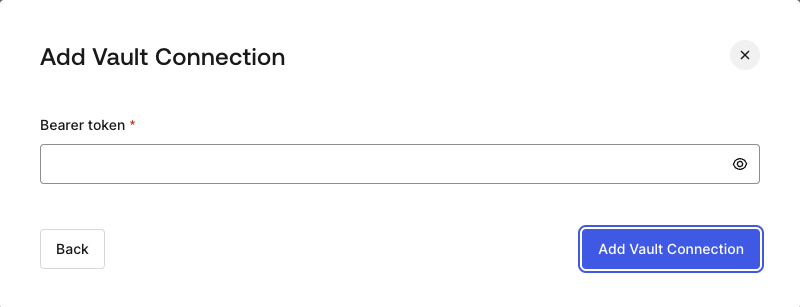
To configure a HTTP Vault Connection using **Bearer Token** authorization, you need to set the required parameters.
<Frame>
  <img src="https://mintcdn.com/docs-staging-chore-management-api-autoupdate/CHcdW8myicgKbZ7q/docs/images/customize/forms/vaults/http-vault-connection-bearer-token.png?fit=max&auto=format&n=CHcdW8myicgKbZ7q&q=85&s=271f7a2c6d9301990fb080f4c63fb4ed" alt="Dashboard > Actions > Forms > Vault > HTTP" data-og-width="800" width="800" data-og-height="307" height="307" data-path="docs/images/customize/forms/vaults/http-vault-connection-bearer-token.png" data-optimize="true" data-opv="3" srcset="https://mintcdn.com/docs-staging-chore-management-api-autoupdate/CHcdW8myicgKbZ7q/docs/images/customize/forms/vaults/http-vault-connection-bearer-token.png?w=280&fit=max&auto=format&n=CHcdW8myicgKbZ7q&q=85&s=a978995147ad9158e70987da595a3c6f 280w, https://mintcdn.com/docs-staging-chore-management-api-autoupdate/CHcdW8myicgKbZ7q/docs/images/customize/forms/vaults/http-vault-connection-bearer-token.png?w=560&fit=max&auto=format&n=CHcdW8myicgKbZ7q&q=85&s=9b2fce556a9383de4702e4784885f5c2 560w, https://mintcdn.com/docs-staging-chore-management-api-autoupdate/CHcdW8myicgKbZ7q/docs/images/customize/forms/vaults/http-vault-connection-bearer-token.png?w=840&fit=max&auto=format&n=CHcdW8myicgKbZ7q&q=85&s=a5dcdac23967abe9d93f7f48971c10bd 840w, https://mintcdn.com/docs-staging-chore-management-api-autoupdate/CHcdW8myicgKbZ7q/docs/images/customize/forms/vaults/http-vault-connection-bearer-token.png?w=1100&fit=max&auto=format&n=CHcdW8myicgKbZ7q&q=85&s=b4669f5366f63e5cb536a5f920898da4 1100w, https://mintcdn.com/docs-staging-chore-management-api-autoupdate/CHcdW8myicgKbZ7q/docs/images/customize/forms/vaults/http-vault-connection-bearer-token.png?w=1650&fit=max&auto=format&n=CHcdW8myicgKbZ7q&q=85&s=ac9aadcdce53a74aebfeb19bd222a15c 1650w, https://mintcdn.com/docs-staging-chore-management-api-autoupdate/CHcdW8myicgKbZ7q/docs/images/customize/forms/vaults/http-vault-connection-bearer-token.png?w=2500&fit=max&auto=format&n=CHcdW8myicgKbZ7q&q=85&s=6ed453c0820061a30b392489c73a24d8 2500w" />
</Frame>

### Input settings

| Parameter    | Description                                           |
| ------------ | ----------------------------------------------------- |
| Bearer Token | Static token used for external service authorization. |

## Configure your HTTP Vault Connection for OAuth Client Credentials

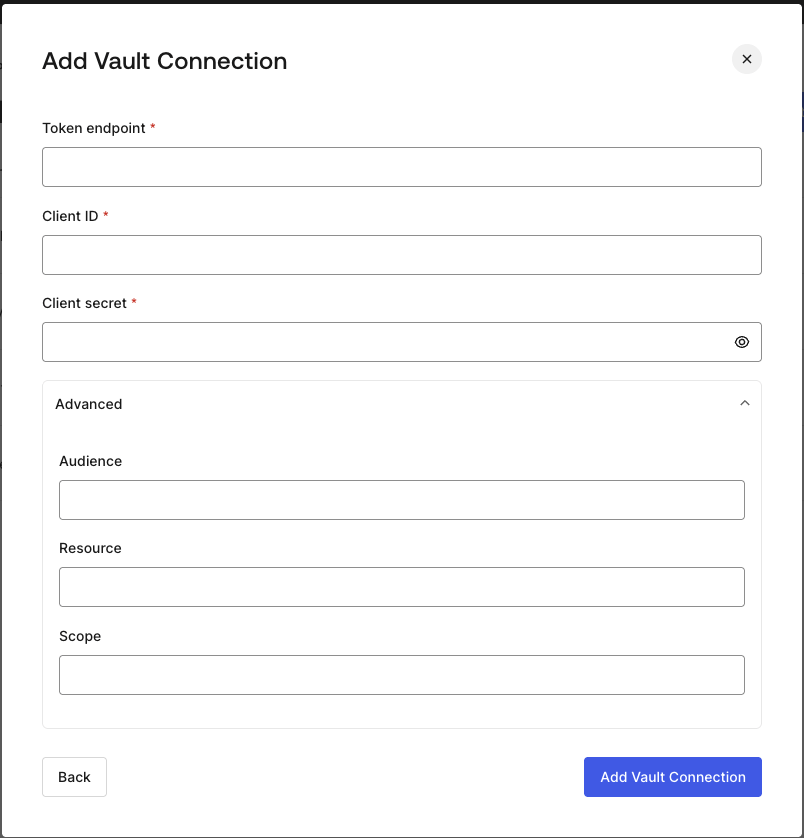
To configure a HTTP Vault Connection using **Client Credentials** authorization, you need to set the required parameters.
<Frame>
  <img src="https://mintcdn.com/docs-staging-chore-management-api-autoupdate/CHcdW8myicgKbZ7q/docs/images/customize/forms/vaults/http-vault-connection-oauth-client-credentials.png?fit=max&auto=format&n=CHcdW8myicgKbZ7q&q=85&s=38d36de4b267e1d5be47d5b1fef114f5" alt="Dashboard > Actions > Forms > Vault > HTTP " data-og-width="804" width="804" data-og-height="838" height="838" data-path="docs/images/customize/forms/vaults/http-vault-connection-oauth-client-credentials.png" data-optimize="true" data-opv="3" srcset="https://mintcdn.com/docs-staging-chore-management-api-autoupdate/CHcdW8myicgKbZ7q/docs/images/customize/forms/vaults/http-vault-connection-oauth-client-credentials.png?w=280&fit=max&auto=format&n=CHcdW8myicgKbZ7q&q=85&s=034ca56055ee8c72c15c14cc7343f49a 280w, https://mintcdn.com/docs-staging-chore-management-api-autoupdate/CHcdW8myicgKbZ7q/docs/images/customize/forms/vaults/http-vault-connection-oauth-client-credentials.png?w=560&fit=max&auto=format&n=CHcdW8myicgKbZ7q&q=85&s=b438b5cef8d50a7bf2a85cec7f5cc8ac 560w, https://mintcdn.com/docs-staging-chore-management-api-autoupdate/CHcdW8myicgKbZ7q/docs/images/customize/forms/vaults/http-vault-connection-oauth-client-credentials.png?w=840&fit=max&auto=format&n=CHcdW8myicgKbZ7q&q=85&s=434d6d194694c5d7a0b60b20896bfdd7 840w, https://mintcdn.com/docs-staging-chore-management-api-autoupdate/CHcdW8myicgKbZ7q/docs/images/customize/forms/vaults/http-vault-connection-oauth-client-credentials.png?w=1100&fit=max&auto=format&n=CHcdW8myicgKbZ7q&q=85&s=b2f282c7da39304b0cc9c8da0f9e3095 1100w, https://mintcdn.com/docs-staging-chore-management-api-autoupdate/CHcdW8myicgKbZ7q/docs/images/customize/forms/vaults/http-vault-connection-oauth-client-credentials.png?w=1650&fit=max&auto=format&n=CHcdW8myicgKbZ7q&q=85&s=7d12fd6d2c4d4d60b267ac5f7df29a2b 1650w, https://mintcdn.com/docs-staging-chore-management-api-autoupdate/CHcdW8myicgKbZ7q/docs/images/customize/forms/vaults/http-vault-connection-oauth-client-credentials.png?w=2500&fit=max&auto=format&n=CHcdW8myicgKbZ7q&q=85&s=14c911fef4cc998b36f3379196e7cfc6 2500w" />
</Frame>

### Input settings

| Parameter           | Description                                                               |
| ------------------- | ------------------------------------------------------------------------- |
| Tenant Endpoint     | Tenant Endpoint of the Authorization Server issuing the Access Tokens.    |
| Client ID           | Client ID of your M2M Application authorized for Custom API.              |
| Client Secret       | Client Secret of your M2M Application authorized for Custom API.          |
| Audience (Optional) | Custom API Audience. Normally used for Custom APIs defined in Auth0.      |
| Resource (Optional) | Custom API Resource. Standard parameter with similar meaning of Audience. |
| Scope (Optional)    | Scope list in string format separated by spaces.                          |

## Configure your HTTP Vault Connection for API Key

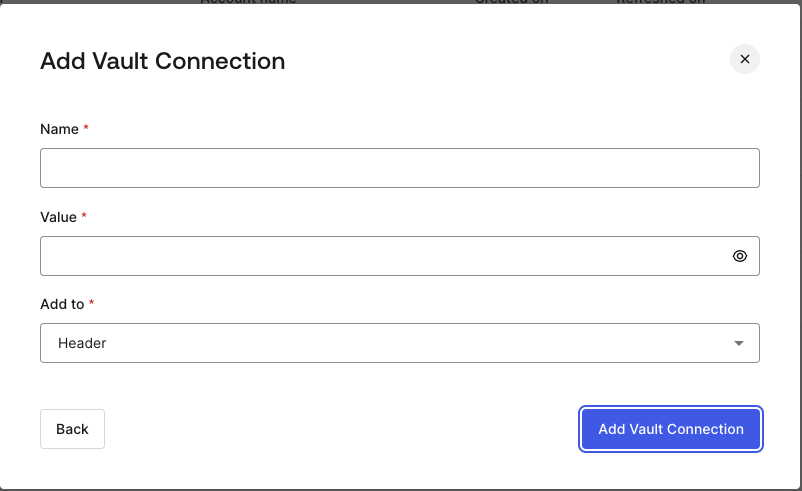
To configure a HTTP Vault Connection using **API Key** authorization, you need to set the required parameters.
<Frame>
  <img src="https://mintcdn.com/docs-staging-chore-management-api-autoupdate/CHcdW8myicgKbZ7q/docs/images/customize/forms/vaults/http-vault-connection-api-key.png?fit=max&auto=format&n=CHcdW8myicgKbZ7q&q=85&s=f0ed467b41f25cc9458d4f182182b4ed" alt="Dashboard > Actions > Forms > Vault > HTTP " data-og-width="802" width="802" data-og-height="491" height="491" data-path="docs/images/customize/forms/vaults/http-vault-connection-api-key.png" data-optimize="true" data-opv="3" srcset="https://mintcdn.com/docs-staging-chore-management-api-autoupdate/CHcdW8myicgKbZ7q/docs/images/customize/forms/vaults/http-vault-connection-api-key.png?w=280&fit=max&auto=format&n=CHcdW8myicgKbZ7q&q=85&s=db5160dec38f57cbd9637c479bbe5862 280w, https://mintcdn.com/docs-staging-chore-management-api-autoupdate/CHcdW8myicgKbZ7q/docs/images/customize/forms/vaults/http-vault-connection-api-key.png?w=560&fit=max&auto=format&n=CHcdW8myicgKbZ7q&q=85&s=e3f6f25a24970ab89d20e4caaffdf053 560w, https://mintcdn.com/docs-staging-chore-management-api-autoupdate/CHcdW8myicgKbZ7q/docs/images/customize/forms/vaults/http-vault-connection-api-key.png?w=840&fit=max&auto=format&n=CHcdW8myicgKbZ7q&q=85&s=f4ad9a98ff8201b720cb9785e9989970 840w, https://mintcdn.com/docs-staging-chore-management-api-autoupdate/CHcdW8myicgKbZ7q/docs/images/customize/forms/vaults/http-vault-connection-api-key.png?w=1100&fit=max&auto=format&n=CHcdW8myicgKbZ7q&q=85&s=c7f0b3bda7b4da09a07fc430549a8530 1100w, https://mintcdn.com/docs-staging-chore-management-api-autoupdate/CHcdW8myicgKbZ7q/docs/images/customize/forms/vaults/http-vault-connection-api-key.png?w=1650&fit=max&auto=format&n=CHcdW8myicgKbZ7q&q=85&s=a2aad2fd14a1acbb301ffc8ef8edc8fa 1650w, https://mintcdn.com/docs-staging-chore-management-api-autoupdate/CHcdW8myicgKbZ7q/docs/images/customize/forms/vaults/http-vault-connection-api-key.png?w=2500&fit=max&auto=format&n=CHcdW8myicgKbZ7q&q=85&s=787bfb95944da41a20ea3b3793aa63b0 2500w" />
</Frame>

### Input settings

| Parameter | Description                                                                                  |
| --------- | -------------------------------------------------------------------------------------------- |
| Name      | API Key name to be added as Header or Query parameter.                                       |
| Value     | API Key value to be added as Header or Query parameter.                                      |
| Add To    | By default, it's Header. Determines whether to add the API Key as Header or Query parameter. |

## Configure your HTTP Vault Connection for Basic Authentication

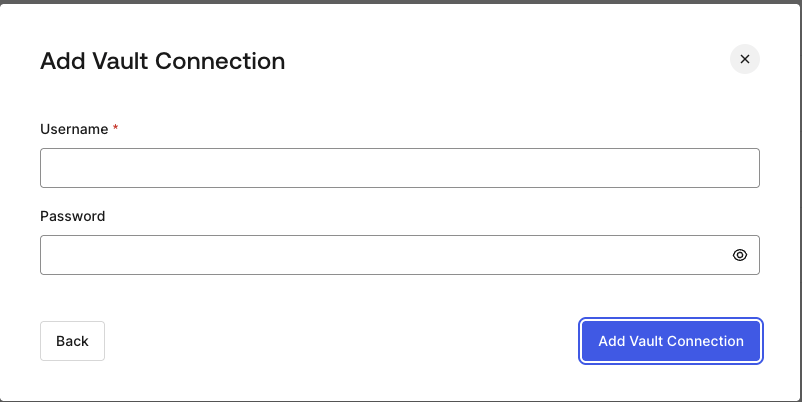
To configure a HTTP Vault Connection using **Basic Auth** authorization, you need to set the required parameters.
<Frame>
  <img src="https://mintcdn.com/docs-staging-chore-management-api-autoupdate/CHcdW8myicgKbZ7q/docs/images/customize/forms/vaults/http-vault-connection-basic-authentication.png?fit=max&auto=format&n=CHcdW8myicgKbZ7q&q=85&s=02688b4a8840aab6b7a1d13660da28fd" alt="Dashboard > Actions > Forms > Vault > HTTP " data-og-width="802" width="802" data-og-height="402" height="402" data-path="docs/images/customize/forms/vaults/http-vault-connection-basic-authentication.png" data-optimize="true" data-opv="3" srcset="https://mintcdn.com/docs-staging-chore-management-api-autoupdate/CHcdW8myicgKbZ7q/docs/images/customize/forms/vaults/http-vault-connection-basic-authentication.png?w=280&fit=max&auto=format&n=CHcdW8myicgKbZ7q&q=85&s=5f521c98339af21f8cc3e7a33d95e6ff 280w, https://mintcdn.com/docs-staging-chore-management-api-autoupdate/CHcdW8myicgKbZ7q/docs/images/customize/forms/vaults/http-vault-connection-basic-authentication.png?w=560&fit=max&auto=format&n=CHcdW8myicgKbZ7q&q=85&s=5eef82f520c5981dc4e2c2584fbb5b9c 560w, https://mintcdn.com/docs-staging-chore-management-api-autoupdate/CHcdW8myicgKbZ7q/docs/images/customize/forms/vaults/http-vault-connection-basic-authentication.png?w=840&fit=max&auto=format&n=CHcdW8myicgKbZ7q&q=85&s=106b1c1c34a105d1b1bb61758f8f1df1 840w, https://mintcdn.com/docs-staging-chore-management-api-autoupdate/CHcdW8myicgKbZ7q/docs/images/customize/forms/vaults/http-vault-connection-basic-authentication.png?w=1100&fit=max&auto=format&n=CHcdW8myicgKbZ7q&q=85&s=e9c1e07f12d2ad7ed10b25db73fef2a4 1100w, https://mintcdn.com/docs-staging-chore-management-api-autoupdate/CHcdW8myicgKbZ7q/docs/images/customize/forms/vaults/http-vault-connection-basic-authentication.png?w=1650&fit=max&auto=format&n=CHcdW8myicgKbZ7q&q=85&s=027c08f24ff1f69bb965560854498d12 1650w, https://mintcdn.com/docs-staging-chore-management-api-autoupdate/CHcdW8myicgKbZ7q/docs/images/customize/forms/vaults/http-vault-connection-basic-authentication.png?w=2500&fit=max&auto=format&n=CHcdW8myicgKbZ7q&q=85&s=54da543a162370f4091e2430b0db71c3 2500w" />
</Frame>

### Input settings

| Parameter | Description                                                                                         |
| --------- | --------------------------------------------------------------------------------------------------- |
| Username  | Username to be concatenated and base64 encoded, then added as Basic Authorization Header parameter. |
| Password  | Password to be concatenated and base64 encoded, then added as Basic Authorization Header parameter. |

<Warning>
  HTTP Vault Connection with Basic Auth configuration, is looking forward to replace the currently built-in option at Flows HTTP Request Action.
</Warning>
