> ## Documentation Index
> Fetch the complete documentation index at: https://docs-staging-chore-management-api-autoupdate.mintlify.site/llms.txt
> Use this file to discover all available pages before exploring further.
# Nœuds et composants
> Découvrez les nœuds de formulaire et les composants proposés.
Les formulaires vous permettent d’ajouter des nœuds et composants, tels que des champs, des blocs et des gadgets logiciels, pour que vos utilisateurs interagissent avec le formulaire. Vous pouvez ensuite faire référence aux données saisies dans les composants de vos formulaires et flux.
## Nœuds de formulaire
Il existe cinq types de nœuds de formulaire : Départ, Étape, Flux, Routeur et Écran de fin. Ces nœuds ont un objectif très précis pour la structure du formulaire.
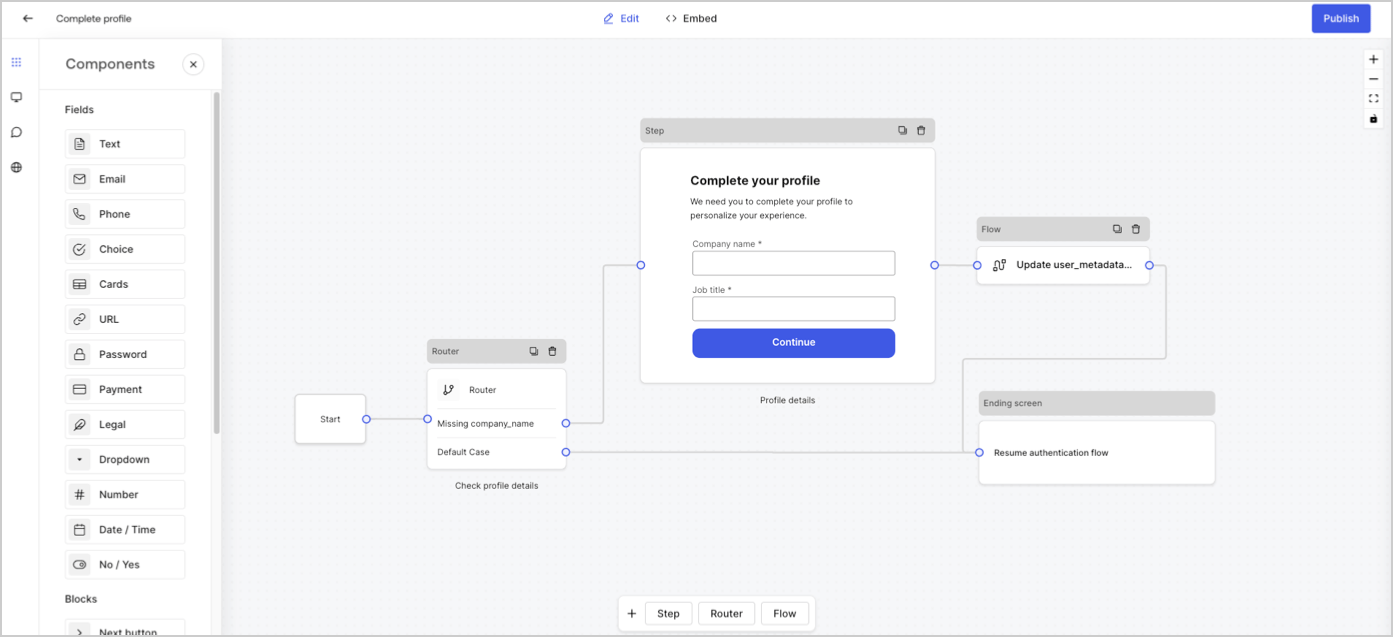 ## Nœud d’étape
Les nœuds d’étape sont la représentation visuelle du formulaire. Ils peuvent contenir un nombre quelconque de composants, tels que des champs, des blocs et des gadgets logiciels, où l’utilisateur peut remplir ses données.
## Nœud d’étape
Les nœuds d’étape sont la représentation visuelle du formulaire. Ils peuvent contenir un nombre quelconque de composants, tels que des champs, des blocs et des gadgets logiciels, où l’utilisateur peut remplir ses données.
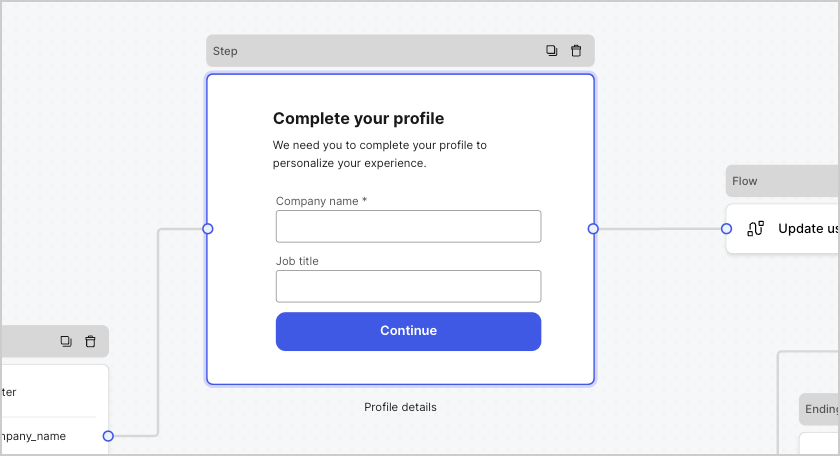 ### Composants de champ
Les champs sont des composants d’interface utilisateur où les utilisateurs saisissent leurs informations dans les formulaires.
### Composants de champ
Les champs sont des composants d’interface utilisateur où les utilisateurs saisissent leurs informations dans les formulaires.
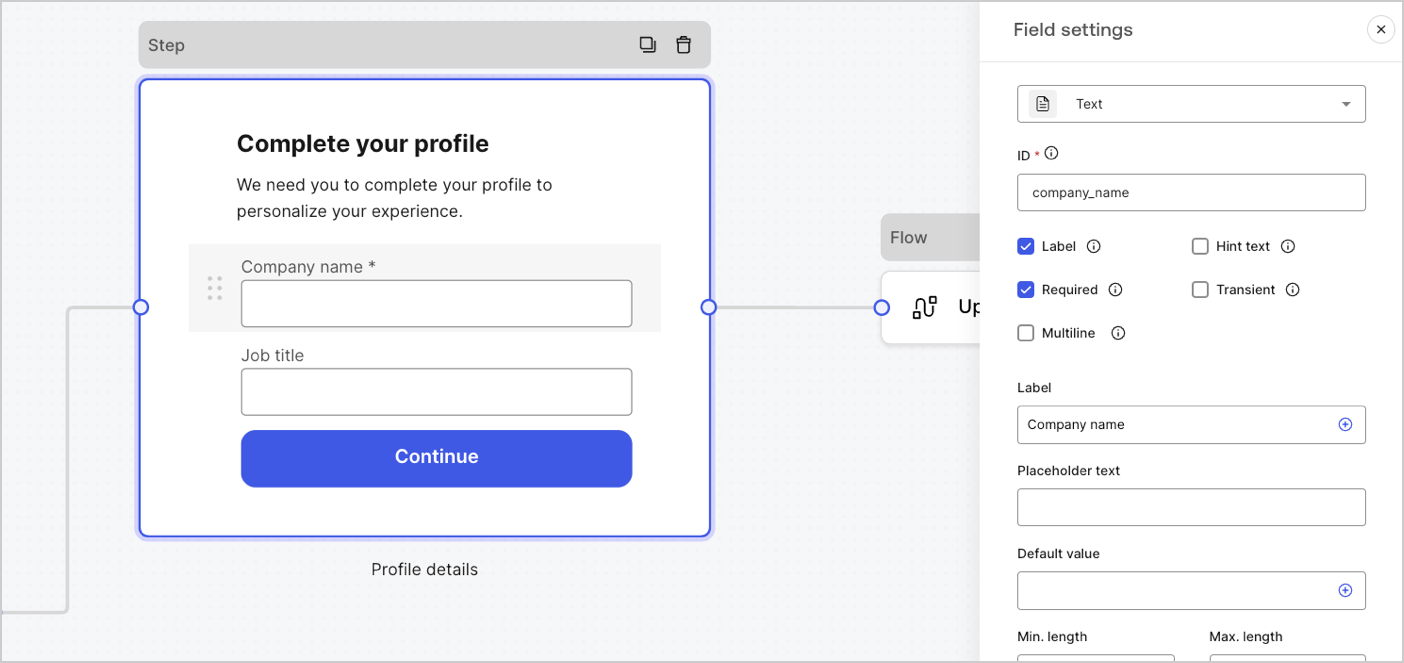 #### Paramètres des champs
Les champs disposent d’un certain nombre de paramètres par défaut que vous pouvez configurer pour répondre à vos exigences.
Les paramètres par défaut des champs sont :
| Paramètres | Description |
| ----------------- | ------------------------------------------- |
| ID | L’ID unique |
| Balise | Afficher ou masquer une balise |
| Requis | La valeur d’entrée est requise |
| Texte d’aide | Afficher un texte d’aide |
| Texte placeholder | Texte visible par l’utilisateur |
| Valeur par défaut | Valeur par défaut visible par l’utilisateur |
| Transitoire | Activer ou désactiver le masque de données |
#### Règles de validation des champs
| Settings (Paramètres) | Description |
| ----------------------------- | ---------------------------------------- |
| Longueur min. / Longueur max. | Exiger une valeur de longueur d’entrée. |
| Valeur min. / Valeur max. | Exiger une longueur de valeur numérique. |
#### Champs proposés dans les formulaires
Les champs proposés avec leurs paramètres particuliers et types de sortie de données sont :
La saisie standard permet à l’utilisateur de saisir n’importe quelle valeur sous forme de chaîne de caractères.
##### Paramètres du champ de texte
Le paramètre du champ de texte est :
| Paramètres | Description |
| ---------- | ------------------------------------- |
| Multiligne | Activer le texte d’entrée multiligne. |
##### Valeur de sortie du champ de texte
Le type de données de la valeur de sortie du champ de texte est une `chaîne de caractères`.
```json lines theme={null}
{
"text_field_id": "Auth0"
}
```
Le champ de saisie standard permet à l’utilisateur de saisir des valeurs sous forme de chaîne de caractères pour le courriel.
##### Valeur de sortie du champ de courriel
Le type de données de la valeur de sortie du champ de courriel est une `string`.
```json lines theme={null}
{
"email_field_id": "username@domain.com"
}
```
La saisie standard permet à l’utilisateur de saisir des valeurs de numéro de téléphone.
##### Paramètres du champ de téléphone
Les paramètres du champ de téléphone sont :
| Paramètre | Description |
| ----------------------------------- | --------------------------------------------------------------------------------------------- |
| Sélecteur de pays | Active/désactive le sélecteur de pays. Par défaut, affiche l’emplacement IP de l’utilisateur. |
| Texte du paramètre fictif du filtre | Texte visible par l’utilisateur dans la fenêtre de recherche de pays. |
##### Valeur de sortie du champ de téléphone
Le type de données de la valeur de sortie du champ de téléphone est une `string` ou, si le sélecteur de pays est activé, un `object`.
La valeur du type de données de sortie du champ de téléphone en tant que `string` :
```json lines theme={null}
{
"phone_field_id": "8005550175"
}
```
La valeur du type de données de sortie du champ de téléphone en tant qu'`object` :
```json lines theme={null}
{
"phone_field_id": {
"national_number": "8005550175",
"national_format": "(800) 555-0175",
"international_number": "+18005550175",
"international_format": "+1 800-555-0175",
"country_code_iso": "US",
"country_code_number": "1"
}
}
```
Champ de saisie standard permettant à l’utilisateur de sélectionner une ou plusieurs valeurs de choix.
##### Paramètres du champ de choix
Les paramètres du champ de choix sont :
| Paramètres | Description |
| -------------------------------- | --------------------------------------------------------------------------- |
| Choix multiples | Activer les choix multiples. |
| Autre option | Laisser les utilisateurs saisir leur propre option. |
| Avancé > Valeurs internes | Attribuer une valeur interne à chaque option de choix. |
| Avancé > > Modification en masse | Modifier en masse les valeurs des balises et des options de choix internes. |
##### Valeur de sortie du champ de choix
Le type de données de la valeur de sortie du champ de choix est soit une `string` soit, si le choix multiple est activé, un `array of strings`.
La valeur du type de données de sortie du champ de choix est une`string` :
```json lines theme={null}
{
"choice_field_id": "Option A"
}
```
La valeur du type de données de sortie du champ de choix est un `array of strings`:
```json lines theme={null}
{
"choice_field_id": ["Option A", "Option B"]
}
```
Saisie standard permettant à l’utilisateur de sélectionner une ou plusieurs valeurs de choix d’image.
##### Paramètres du champ de cartes
Les paramètres du champ de cartes sont :
| Paramètres | Description |
| ------------------------- | --------------------------------------------- |
| Choix multiple | Activer plusieurs options de choix. |
| Masquer les étiquettes | Masquer les étiquettes des cartes. |
| Avancé > Valeurs internes | Attribuez une valeur interne à chaque option. |
##### Valeur de sortie du champ de cartes
Le type de données de la valeur de sortie du champ de cartes est soit une `string` soit, si le choix multiple est activé, un `array of strings`.
La valeur du type de données de sortie du champ de cartes est une`string` :
```json lines theme={null}
{
"card_field_id": "Option A"
}
```
La valeur du type de données de sortie du champ de cartes est un `array of strings` :
```json lines theme={null}
{
"card_field_id": ["Option A", "Option B"]
}
```
La saisie standard permet à l’utilisateur de saisir une valeur d’URL
##### Valeur de sortie du champ d’URL
Le type de données de la valeur de sortie du champ d’URL est une chaîne de caractères :
```json lines theme={null}
{
"url_field_id": "https://auth0.com"
}
```
La saisie standard permet à l’utilisateur de saisir un mot de passe ou une valeur secrète.
##### Paramètres du champ relatif au mot de passe :
Les paramètres du champ de mot de passe sont :
| Paramètres | Description |
| -------------------------------- | ------------------------------------------------------------------------------------------------------------------------------------------------------------------------------------------------------------------------- |
| Exige un mot de passe complexe | Les mots de passe doivent contenir une majuscule, une minuscule, un symbole et un chiffre. |
| Appliquer les directives du NIST | Le mot de passe ne peut pas comporter moins de 8 caractères, mots de passe obtenus à partir de corpus de violations précédentes, mots du dictionnaire, caractères répétitifs ou séquentiels, mots spécifiques au contenu. |
| Ajouter un indicateur de force | Un indicateur graphique avec une échelle rouge, jaune et verte s’affiche sous le champ du mot de passe pour afficher la force du mot de passe saisi. |
| Hachage | Sélectionnez un algorithme pour hacher la valeur d’entrée directement dans le navigateur. |
##### Valeur de sortie du champ de mot de passe
Le type de données de la valeur de sortie du champ de mot de passe est une`chaîne de caractères`masquée :
```json lines theme={null}
{
"password_field_id": "███"
}
```
La saisie standard permet à un utilisateur de saisir des informations de paiement en utilisant un fournisseur de paiement. Les paiements sont traités avant le nœud de fin.
##### Paramètres des champs de paiement
Les paramètres du champ de paiement sont :
| Paramètres | Description |
| --------------------------------------------------------------------------------------------------------------------------------- | ------------------------------------------------------------------------- |
| Type de paiement | Sélectionnez un paiement unique (frais) ou récurrent (abonnement). |
| Montant | Spécifiez le montant du paiement unique (frais). |
| Devise | Spécifiez la devise pour un paiement unique (frais). |
| Action d’abonnement | Choisissez de créer ou de mettre à jour un abonnement existant. |
| Action client | Sélectionnez cette action pour créer ou mettre à jour un client existant. |
| Afficher et modifier le numéro de la carte, la date d’expiration, les étiquettes du code de sécurité et les marques de confiance. | |
##### Valeur de sortie du champ de paiement
Le type de données de la valeur de sortie du champ de paiement est soit une chaîne de caractères, soit un objet pour les flux d’après soumission.
Le type de données de la valeur de sortie du champ de paiement est une`string` :
```json lines theme={null}
{
"payment_field_id": "pm_1P19e..."
}
```
Le type de données de la valeur de sortie du champ de paiement pour les abonnements en tant qu'`object` :
```json lines theme={null}
{
"payment_field_id": {
"payment_method_id": "pm_1P19e...",
"customer_id": "cus_PqrM...",
"price_ids": [
"price_1ONHR..."
],
"subscription_id": "sub_1P1A...",
"payment_intent_id": "pi_3P19e5..."
}
}
```
Le type de données de la valeur de sortie du champ de paiement pour la charge en tant qu'`object` :
```json lines theme={null}
{
"payment_field_id": {
"payment_method_id": "pm_1P19e...",
"customer_id": "cus_PqrM...",
"amount": 100,
"payment_intent_id": "pi_3P19e5..."
}
}
```
Saisie standard qui ajoute un texte juridique et une entrée de vérification.
##### Valeur de sortie du champ légal
Le type de donnée de la valeur de sortie du champ légal est un`boolean`.
```json lines theme={null}
{
"legal_field_id": true
}
```
Champ de saisie standard permettant à l’utilisateur de sélectionner une ou plusieurs options dans une liste déroulante.
##### Paramètres du champ de liste déroulante
Les paramètres du champ de liste déroulante sont :
| Paramètres | Description |
| ------------------------------ | ------------------------------------------------------- |
| Sélecteur multiple | Activer plusieurs options. |
| Avancé > Valeurs internes | Attribuer une valeur interne à chaque option. |
| Avancé > Modification en masse | Étiquette de modification en masse et valeurs internes. |
##### Valeur de sortie du champ de liste déroulante
Le type de données de la valeur de sortie du champ de liste déroulante est soit une `string` soit, si le choix multiple est activé, un `array of strings`.
La valeur du type de données de sortie du champ de liste déroulante en tant que `string`:
```json lines theme={null}
{
"dropdown_field_id": "Option A"
}
```
La valeur du type de données de sortie du champ de liste déroulante en tant que `array of strings` :
```json lines theme={null}
{
"dropdown_field_id": ["Option A", "Option B"]
}
```
.
##### Valeur de sortie du champ numérique
Le type de données de la valeur de sortie du champ numérique est un `number`.
```json lines theme={null}
{
"number_field_id": 123
}
```
Saisie standard qui permet à un utilisateur de saisir soit des valeurs de date ou d’heure.
##### Paramètres du champ Date / Heure
Les paramètres du champ Date / Heure sont :
| Key (Clé) | Description |
| --------- | ------------------------------------- |
| Format | Sélectionnez le format Date ou Heure. |
##### Valeur de sortie du champ Date / Heure
La valeur du type de données de sortie du champ Date / Heure est une `string` :
```json lines theme={null}
{
"date_time_field_id": "2023-04-11"
}
```
La valeur du type de données de sortie du champ Date / Heure est, en ce qui concerne l’heure, une `string`:
```json lines theme={null}
{
"date_time_field_id": "23:15"
}
```
Saisie standard qui permet à un utilisateur de saisir des valeurs vraies ou fausses.
##### Valeur de sortie du champ booléen
Le type de donnée de la valeur de sortie du champ booléen est un nombre booléen.
```json lines theme={null}
{
"boolean_field_id": true
}
```
Champ standard que vous pouvez personnaliser pour créer votre propre champ.
##### Paramètres des champs personnalisés
La configuration de champ personnalisé est :
| Paramètres | Description |
| ----------- | ----------------------------------------------------------------------------------------------------------------------------------------------- |
| Params | Ajouter des paires clé-valeur pour référence dans le code source du champ personnalisé. |
| Code source | Ajouter du code JavaScript dans le champ personnalisé. |
| Schéma JSON | Par défaut, le champ personnalisé accepte tous les formats de valeurs. Toutefois, vous pouvez utiliser le schéma JSON pour valider les valeurs. |
Pour en savoir plus, consultez [Composants de champ personnalisé pour les formulaires](/docs/fr-ca/customize/forms/custom-field-components).
### Composants de blocs
Les blocs sont des composants d’interface utilisateur qui ajoutent des fonctionnalités à vos formulaires sans recueillir d’informations de l'utilisateur.
#### Paramètres des champs
Les champs disposent d’un certain nombre de paramètres par défaut que vous pouvez configurer pour répondre à vos exigences.
Les paramètres par défaut des champs sont :
| Paramètres | Description |
| ----------------- | ------------------------------------------- |
| ID | L’ID unique |
| Balise | Afficher ou masquer une balise |
| Requis | La valeur d’entrée est requise |
| Texte d’aide | Afficher un texte d’aide |
| Texte placeholder | Texte visible par l’utilisateur |
| Valeur par défaut | Valeur par défaut visible par l’utilisateur |
| Transitoire | Activer ou désactiver le masque de données |
#### Règles de validation des champs
| Settings (Paramètres) | Description |
| ----------------------------- | ---------------------------------------- |
| Longueur min. / Longueur max. | Exiger une valeur de longueur d’entrée. |
| Valeur min. / Valeur max. | Exiger une longueur de valeur numérique. |
#### Champs proposés dans les formulaires
Les champs proposés avec leurs paramètres particuliers et types de sortie de données sont :
La saisie standard permet à l’utilisateur de saisir n’importe quelle valeur sous forme de chaîne de caractères.
##### Paramètres du champ de texte
Le paramètre du champ de texte est :
| Paramètres | Description |
| ---------- | ------------------------------------- |
| Multiligne | Activer le texte d’entrée multiligne. |
##### Valeur de sortie du champ de texte
Le type de données de la valeur de sortie du champ de texte est une `chaîne de caractères`.
```json lines theme={null}
{
"text_field_id": "Auth0"
}
```
Le champ de saisie standard permet à l’utilisateur de saisir des valeurs sous forme de chaîne de caractères pour le courriel.
##### Valeur de sortie du champ de courriel
Le type de données de la valeur de sortie du champ de courriel est une `string`.
```json lines theme={null}
{
"email_field_id": "username@domain.com"
}
```
La saisie standard permet à l’utilisateur de saisir des valeurs de numéro de téléphone.
##### Paramètres du champ de téléphone
Les paramètres du champ de téléphone sont :
| Paramètre | Description |
| ----------------------------------- | --------------------------------------------------------------------------------------------- |
| Sélecteur de pays | Active/désactive le sélecteur de pays. Par défaut, affiche l’emplacement IP de l’utilisateur. |
| Texte du paramètre fictif du filtre | Texte visible par l’utilisateur dans la fenêtre de recherche de pays. |
##### Valeur de sortie du champ de téléphone
Le type de données de la valeur de sortie du champ de téléphone est une `string` ou, si le sélecteur de pays est activé, un `object`.
La valeur du type de données de sortie du champ de téléphone en tant que `string` :
```json lines theme={null}
{
"phone_field_id": "8005550175"
}
```
La valeur du type de données de sortie du champ de téléphone en tant qu'`object` :
```json lines theme={null}
{
"phone_field_id": {
"national_number": "8005550175",
"national_format": "(800) 555-0175",
"international_number": "+18005550175",
"international_format": "+1 800-555-0175",
"country_code_iso": "US",
"country_code_number": "1"
}
}
```
Champ de saisie standard permettant à l’utilisateur de sélectionner une ou plusieurs valeurs de choix.
##### Paramètres du champ de choix
Les paramètres du champ de choix sont :
| Paramètres | Description |
| -------------------------------- | --------------------------------------------------------------------------- |
| Choix multiples | Activer les choix multiples. |
| Autre option | Laisser les utilisateurs saisir leur propre option. |
| Avancé > Valeurs internes | Attribuer une valeur interne à chaque option de choix. |
| Avancé > > Modification en masse | Modifier en masse les valeurs des balises et des options de choix internes. |
##### Valeur de sortie du champ de choix
Le type de données de la valeur de sortie du champ de choix est soit une `string` soit, si le choix multiple est activé, un `array of strings`.
La valeur du type de données de sortie du champ de choix est une`string` :
```json lines theme={null}
{
"choice_field_id": "Option A"
}
```
La valeur du type de données de sortie du champ de choix est un `array of strings`:
```json lines theme={null}
{
"choice_field_id": ["Option A", "Option B"]
}
```
Saisie standard permettant à l’utilisateur de sélectionner une ou plusieurs valeurs de choix d’image.
##### Paramètres du champ de cartes
Les paramètres du champ de cartes sont :
| Paramètres | Description |
| ------------------------- | --------------------------------------------- |
| Choix multiple | Activer plusieurs options de choix. |
| Masquer les étiquettes | Masquer les étiquettes des cartes. |
| Avancé > Valeurs internes | Attribuez une valeur interne à chaque option. |
##### Valeur de sortie du champ de cartes
Le type de données de la valeur de sortie du champ de cartes est soit une `string` soit, si le choix multiple est activé, un `array of strings`.
La valeur du type de données de sortie du champ de cartes est une`string` :
```json lines theme={null}
{
"card_field_id": "Option A"
}
```
La valeur du type de données de sortie du champ de cartes est un `array of strings` :
```json lines theme={null}
{
"card_field_id": ["Option A", "Option B"]
}
```
La saisie standard permet à l’utilisateur de saisir une valeur d’URL
##### Valeur de sortie du champ d’URL
Le type de données de la valeur de sortie du champ d’URL est une chaîne de caractères :
```json lines theme={null}
{
"url_field_id": "https://auth0.com"
}
```
La saisie standard permet à l’utilisateur de saisir un mot de passe ou une valeur secrète.
##### Paramètres du champ relatif au mot de passe :
Les paramètres du champ de mot de passe sont :
| Paramètres | Description |
| -------------------------------- | ------------------------------------------------------------------------------------------------------------------------------------------------------------------------------------------------------------------------- |
| Exige un mot de passe complexe | Les mots de passe doivent contenir une majuscule, une minuscule, un symbole et un chiffre. |
| Appliquer les directives du NIST | Le mot de passe ne peut pas comporter moins de 8 caractères, mots de passe obtenus à partir de corpus de violations précédentes, mots du dictionnaire, caractères répétitifs ou séquentiels, mots spécifiques au contenu. |
| Ajouter un indicateur de force | Un indicateur graphique avec une échelle rouge, jaune et verte s’affiche sous le champ du mot de passe pour afficher la force du mot de passe saisi. |
| Hachage | Sélectionnez un algorithme pour hacher la valeur d’entrée directement dans le navigateur. |
##### Valeur de sortie du champ de mot de passe
Le type de données de la valeur de sortie du champ de mot de passe est une`chaîne de caractères`masquée :
```json lines theme={null}
{
"password_field_id": "███"
}
```
La saisie standard permet à un utilisateur de saisir des informations de paiement en utilisant un fournisseur de paiement. Les paiements sont traités avant le nœud de fin.
##### Paramètres des champs de paiement
Les paramètres du champ de paiement sont :
| Paramètres | Description |
| --------------------------------------------------------------------------------------------------------------------------------- | ------------------------------------------------------------------------- |
| Type de paiement | Sélectionnez un paiement unique (frais) ou récurrent (abonnement). |
| Montant | Spécifiez le montant du paiement unique (frais). |
| Devise | Spécifiez la devise pour un paiement unique (frais). |
| Action d’abonnement | Choisissez de créer ou de mettre à jour un abonnement existant. |
| Action client | Sélectionnez cette action pour créer ou mettre à jour un client existant. |
| Afficher et modifier le numéro de la carte, la date d’expiration, les étiquettes du code de sécurité et les marques de confiance. | |
##### Valeur de sortie du champ de paiement
Le type de données de la valeur de sortie du champ de paiement est soit une chaîne de caractères, soit un objet pour les flux d’après soumission.
Le type de données de la valeur de sortie du champ de paiement est une`string` :
```json lines theme={null}
{
"payment_field_id": "pm_1P19e..."
}
```
Le type de données de la valeur de sortie du champ de paiement pour les abonnements en tant qu'`object` :
```json lines theme={null}
{
"payment_field_id": {
"payment_method_id": "pm_1P19e...",
"customer_id": "cus_PqrM...",
"price_ids": [
"price_1ONHR..."
],
"subscription_id": "sub_1P1A...",
"payment_intent_id": "pi_3P19e5..."
}
}
```
Le type de données de la valeur de sortie du champ de paiement pour la charge en tant qu'`object` :
```json lines theme={null}
{
"payment_field_id": {
"payment_method_id": "pm_1P19e...",
"customer_id": "cus_PqrM...",
"amount": 100,
"payment_intent_id": "pi_3P19e5..."
}
}
```
Saisie standard qui ajoute un texte juridique et une entrée de vérification.
##### Valeur de sortie du champ légal
Le type de donnée de la valeur de sortie du champ légal est un`boolean`.
```json lines theme={null}
{
"legal_field_id": true
}
```
Champ de saisie standard permettant à l’utilisateur de sélectionner une ou plusieurs options dans une liste déroulante.
##### Paramètres du champ de liste déroulante
Les paramètres du champ de liste déroulante sont :
| Paramètres | Description |
| ------------------------------ | ------------------------------------------------------- |
| Sélecteur multiple | Activer plusieurs options. |
| Avancé > Valeurs internes | Attribuer une valeur interne à chaque option. |
| Avancé > Modification en masse | Étiquette de modification en masse et valeurs internes. |
##### Valeur de sortie du champ de liste déroulante
Le type de données de la valeur de sortie du champ de liste déroulante est soit une `string` soit, si le choix multiple est activé, un `array of strings`.
La valeur du type de données de sortie du champ de liste déroulante en tant que `string`:
```json lines theme={null}
{
"dropdown_field_id": "Option A"
}
```
La valeur du type de données de sortie du champ de liste déroulante en tant que `array of strings` :
```json lines theme={null}
{
"dropdown_field_id": ["Option A", "Option B"]
}
```
.
##### Valeur de sortie du champ numérique
Le type de données de la valeur de sortie du champ numérique est un `number`.
```json lines theme={null}
{
"number_field_id": 123
}
```
Saisie standard qui permet à un utilisateur de saisir soit des valeurs de date ou d’heure.
##### Paramètres du champ Date / Heure
Les paramètres du champ Date / Heure sont :
| Key (Clé) | Description |
| --------- | ------------------------------------- |
| Format | Sélectionnez le format Date ou Heure. |
##### Valeur de sortie du champ Date / Heure
La valeur du type de données de sortie du champ Date / Heure est une `string` :
```json lines theme={null}
{
"date_time_field_id": "2023-04-11"
}
```
La valeur du type de données de sortie du champ Date / Heure est, en ce qui concerne l’heure, une `string`:
```json lines theme={null}
{
"date_time_field_id": "23:15"
}
```
Saisie standard qui permet à un utilisateur de saisir des valeurs vraies ou fausses.
##### Valeur de sortie du champ booléen
Le type de donnée de la valeur de sortie du champ booléen est un nombre booléen.
```json lines theme={null}
{
"boolean_field_id": true
}
```
Champ standard que vous pouvez personnaliser pour créer votre propre champ.
##### Paramètres des champs personnalisés
La configuration de champ personnalisé est :
| Paramètres | Description |
| ----------- | ----------------------------------------------------------------------------------------------------------------------------------------------- |
| Params | Ajouter des paires clé-valeur pour référence dans le code source du champ personnalisé. |
| Code source | Ajouter du code JavaScript dans le champ personnalisé. |
| Schéma JSON | Par défaut, le champ personnalisé accepte tous les formats de valeurs. Toutefois, vous pouvez utiliser le schéma JSON pour valider les valeurs. |
Pour en savoir plus, consultez [Composants de champ personnalisé pour les formulaires](/docs/fr-ca/customize/forms/custom-field-components).
### Composants de blocs
Les blocs sont des composants d’interface utilisateur qui ajoutent des fonctionnalités à vos formulaires sans recueillir d’informations de l'utilisateur.
 #### Blocs proposés dans les formulaires
Les blocs proposés sont les suivant :
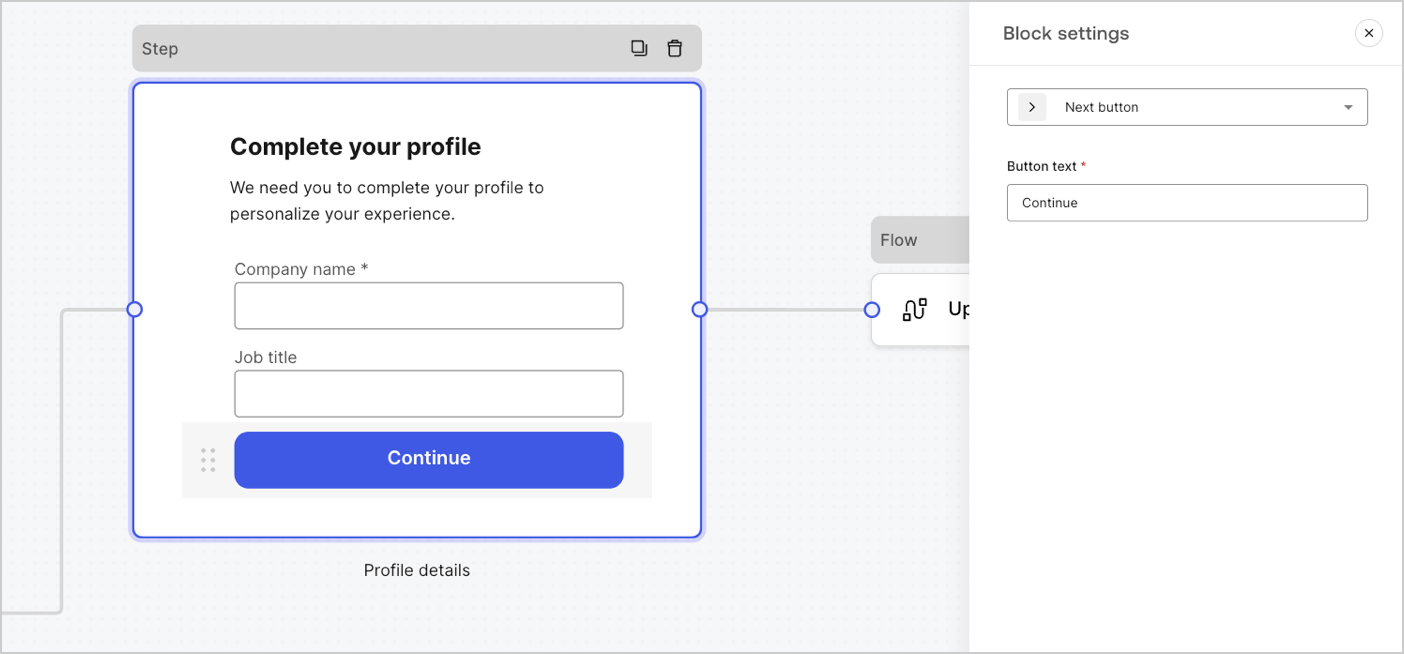
Un bouton qui permet aux utilisateurs de continuer vers le nœud de formulaire suivant.
* Avant de poursuivre, les règles de validation des champs sont appliquées et validées côté client et côté serveur. Si les règles de validation des champs échouent, un message d’erreur s’affiche pour permettre à l’utilisateur de vérifier.
* Si le nœud suivant est un nœud de flux, un chargeur spinner s’affiche jusqu’à ce que le flux soit terminé. Si le flux échoue ou renvoie un message d’erreur personnalisé, un message d’erreur s’affiche.
Un bouton qui permet aux utilisateurs de revenir au nœud de l’étape précédente
Si un utilisateur sélectionne le bouton précédent, les règles de validation des champs sont réexécutées même si aucune modification n’est apportée aux données saisies avant de continuer.
Un bouton qui permet aux utilisateurs de sauter l’étape actuelle et de passer directement au nœud de destination.
Si l’étape en cours est ignorée, aucune information n’est validée ni collectée pour cette étape.
A component that lets users re-run a flow to generate and send a new OTP code
if a user selects the resend button, the associated flow will generate and send a new OTP code.
| Settings | Description |
| -------------- | -------------------------------------------------------------------------------------------------------------------------------------------------------------------------------------------------------------------------------------------------------------------------------------------------------------- |
| Text alignment | Select text alignment, left, center, or right |
| Text | Default text displayed when users select the resend button |
| Button text | Button text |
| Waiting text | Text displayed when users have selected the resend button. Replaces `Text` and the `Button text` settings. Use the `“{{remaining_seconds}}”` variable to dynamically display the remaining number of seconds until the send button is enabled again. For example: “Resend in `{{remaining_seconds}}` seconds”. |
| Flow | Flow executed after the user selects the resend button. |
| Max attempts | The maximum number of attempts the user can select the resend button |
| Waiting time | The waiting time between attempts in seconds. |
Un bloc de texte enrichi pour personnaliser le nœud d’étape avec des informations supplémentaires.
Une ligne pour diviser les différentes sections du nœud d’étape. Elle peut contenir un petit texte.
Un bloc HTML pour créer votre interface utilisateur personnalisée.
Un bloc d’image pour personnaliser l’étape d’ajout d’images.
### Composants de gadgets logiciels
Les gadgets logiciels sont des composants préconçus, avec des intégrations tierces, qui ajoutent de la logique côté client et côté serveur à vos formulaires.
#### Blocs proposés dans les formulaires
Les blocs proposés sont les suivant :
Un bouton qui permet aux utilisateurs de continuer vers le nœud de formulaire suivant.
* Avant de poursuivre, les règles de validation des champs sont appliquées et validées côté client et côté serveur. Si les règles de validation des champs échouent, un message d’erreur s’affiche pour permettre à l’utilisateur de vérifier.
* Si le nœud suivant est un nœud de flux, un chargeur spinner s’affiche jusqu’à ce que le flux soit terminé. Si le flux échoue ou renvoie un message d’erreur personnalisé, un message d’erreur s’affiche.
Un bouton qui permet aux utilisateurs de revenir au nœud de l’étape précédente
Si un utilisateur sélectionne le bouton précédent, les règles de validation des champs sont réexécutées même si aucune modification n’est apportée aux données saisies avant de continuer.
Un bouton qui permet aux utilisateurs de sauter l’étape actuelle et de passer directement au nœud de destination.
Si l’étape en cours est ignorée, aucune information n’est validée ni collectée pour cette étape.
A component that lets users re-run a flow to generate and send a new OTP code
if a user selects the resend button, the associated flow will generate and send a new OTP code.
| Settings | Description |
| -------------- | -------------------------------------------------------------------------------------------------------------------------------------------------------------------------------------------------------------------------------------------------------------------------------------------------------------- |
| Text alignment | Select text alignment, left, center, or right |
| Text | Default text displayed when users select the resend button |
| Button text | Button text |
| Waiting text | Text displayed when users have selected the resend button. Replaces `Text` and the `Button text` settings. Use the `“{{remaining_seconds}}”` variable to dynamically display the remaining number of seconds until the send button is enabled again. For example: “Resend in `{{remaining_seconds}}` seconds”. |
| Flow | Flow executed after the user selects the resend button. |
| Max attempts | The maximum number of attempts the user can select the resend button |
| Waiting time | The waiting time between attempts in seconds. |
Un bloc de texte enrichi pour personnaliser le nœud d’étape avec des informations supplémentaires.
Une ligne pour diviser les différentes sections du nœud d’étape. Elle peut contenir un petit texte.
Un bloc HTML pour créer votre interface utilisateur personnalisée.
Un bloc d’image pour personnaliser l’étape d’ajout d’images.
### Composants de gadgets logiciels
Les gadgets logiciels sont des composants préconçus, avec des intégrations tierces, qui ajoutent de la logique côté client et côté serveur à vos formulaires.
 #### Gadgets logiciels proposés dans les formulaires
Le gadget logiciel proposé est le suivant :
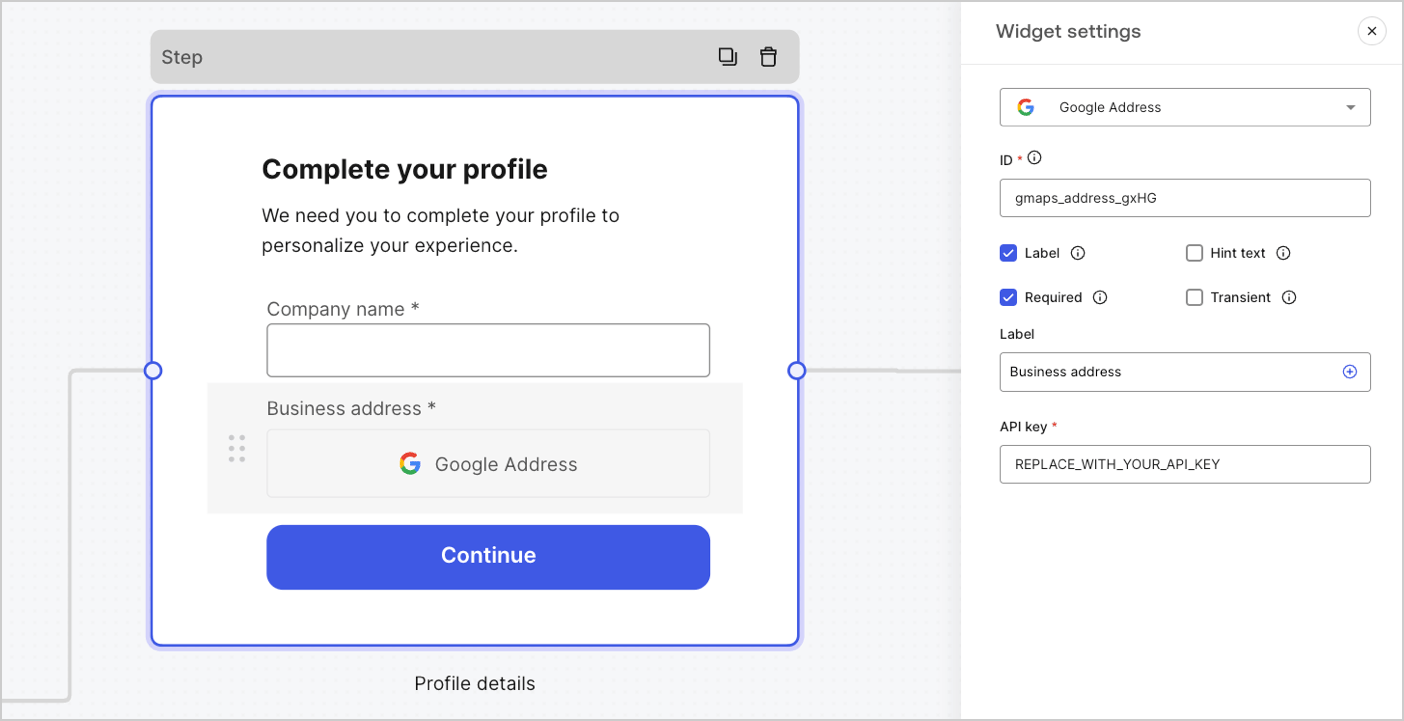
Un widget qui permet à un utilisateur de saisir et de valider son adresse.
##### Paramètres du widget Google Address
Les paramètres du widget Google Address sont :
| Settings (Paramètres) | Description |
| --------------------- | ----------------------------------------------------------------- |
| Clé API | Nécessite une clé API Google Maps pour authentifier les demandes. |
##### Valeur de sortie du widget Google Address.
Le type de données de la valeur de sortie du widget Google Address est un `object`.
```json lines theme={null}
{
"google_address_widget_id": {
"type": "Feature",
"geometry": {
"type": "Point",
"coordinates": [
-73.9654415,
40.8054491
]
},
"properties": {
"geocoding": {
"type": "house",
"housenumber": "2880",
"street": "Broadway",
"city": "New York",
"county": "New York County",
"state": "New York",
"country": "United States",
"postcode": "10025"
}
}
}
}
```
A widget that helps protect your website from spam and abuse by verifying that a user is a human and not a bot.
The widget supports:
* Score-based (v3)
* Challenge (v2)
* Invisible reCAPTCHA badge
Differences between `v2` and `v3`:
* `v2` requires user interaction with visible challenges, such as clicking a checkbox or solving puzzles.
* `v3` runs in the background and provides a score based on user behavior, without requiring user interaction. When using this version, make sure to implement additional business logic to handle the score and determine if further action is needed.
##### Google reCAPTCHA widget settings
The Google reCAPTCHA widget settings include:
| Settings | Description |
| ---------- | ------------------------------------------------------------------------------------------------------------------------------------------------------------------------------------------------------------------------- |
| Site key | The public site key used to initialize the reCAPTCHA on your website. You can create it in [Google reCAPTCHA console](https://www.google.com/recaptcha/admin/create) or your Google Cloud Platform project. |
| Secret key | The secret key used to communicate securely with the reCAPTCHA service server-side. You can create it in [Google reCAPTCHA console](https://www.google.com/recaptcha/admin/create) or your Google Cloud Platform project. |
##### Google reCAPTCHA output value
The Google reCAPTCHA widget output value data type is an `object`.
Example of `v2` response:
```json lines theme={null}
{
"recaptcha_widget_id": {
"success": true,
"challenge_ts": "2025-03-26T11:22:18Z",
"hostname": "auth.example.com"
}
}
```
Example of `v3` response:
```json lines theme={null}
{
"recaptcha_widget_id": {
"success": true,
"challenge_ts": "2025-03-26T11:22:18Z",
"hostname": "auth.example.com",
"score": 0.9
}
}
```
A widget that lets a user verify their identity using verifiable credentials stored in their digital wallet.
##### Verifiable Credentials widget settings
The Verifiable Credentials widget settings include:
| Settings | Description |
| -------------------- | ------------------------------------------------------------------------------------------------------------------------------------------------------------------------------------------------ |
| URL | The URL value used to generate the QR code. This value is returned in the `engagement` property of the verification request. |
| Link text | Alternative text that will be displayed for users who cannot scan the QR code and prefer to open the link directly on their device. |
| Size | The size of the QR code. |
| Public token | The access token required to consume the polling endpoint. Please ensure the token is generated with only the `read:verification_request` scope to avoid exposing access to other resources. |
| Verification ID | The verification ID generated when you start the verification request. |
| Maximum waiting time | The maximum amount of time to wait for the verification process to complete. Once the set time is reached, polling will stop and an error will be thrown, regardless of the verification status. |
##### Verifiable Credentials output value
The Verifiable Credentials widget output value data type is an `object`.
```json lines theme={null}
{
"verifiable_credentials_widget_id": {
"state": "honored",
"reason": "...", // The reason field contains additional information (if available) regarding the state of the verification request.
"presentation": {} // The presentation contains the claims provided by the wallet in response to the presentation definition.
}
}
```
## Nœud de routage.
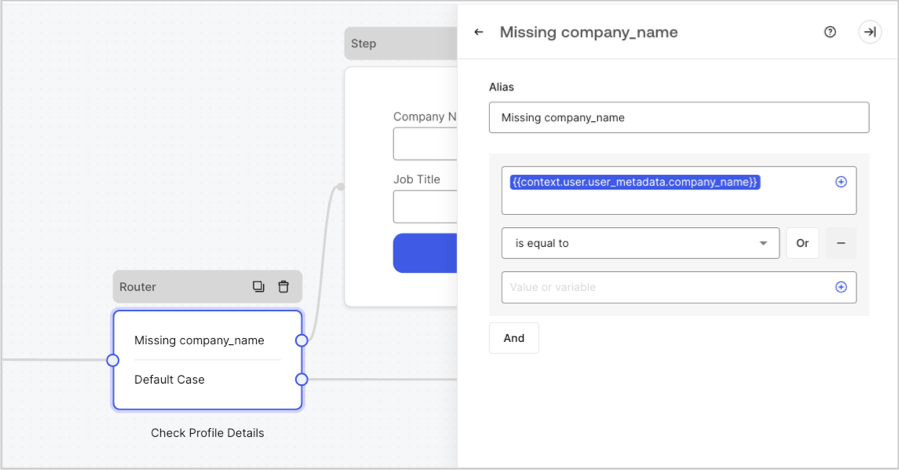
Les nœuds de routeur vous permettent d’ajouter des règles pour créer des sauts logiques conditionnels entre les nœuds.
Par défaut, un nœud de routeur dispose d’une seule règle de passage nommée **Default case (Cas par défaut)** qui se connecte à d’autres nœuds. Vous pouvez ajouter des règles supplémentaires basées sur un ensemble de conditions qu’une variable doit remplir pour se connecter ensuite à d’autres nœuds. Pour en savoir plus, consultez [Routeur](/docs/fr-ca/customize/forms/routers).
#### Gadgets logiciels proposés dans les formulaires
Le gadget logiciel proposé est le suivant :
Un widget qui permet à un utilisateur de saisir et de valider son adresse.
##### Paramètres du widget Google Address
Les paramètres du widget Google Address sont :
| Settings (Paramètres) | Description |
| --------------------- | ----------------------------------------------------------------- |
| Clé API | Nécessite une clé API Google Maps pour authentifier les demandes. |
##### Valeur de sortie du widget Google Address.
Le type de données de la valeur de sortie du widget Google Address est un `object`.
```json lines theme={null}
{
"google_address_widget_id": {
"type": "Feature",
"geometry": {
"type": "Point",
"coordinates": [
-73.9654415,
40.8054491
]
},
"properties": {
"geocoding": {
"type": "house",
"housenumber": "2880",
"street": "Broadway",
"city": "New York",
"county": "New York County",
"state": "New York",
"country": "United States",
"postcode": "10025"
}
}
}
}
```
A widget that helps protect your website from spam and abuse by verifying that a user is a human and not a bot.
The widget supports:
* Score-based (v3)
* Challenge (v2)
* Invisible reCAPTCHA badge
Differences between `v2` and `v3`:
* `v2` requires user interaction with visible challenges, such as clicking a checkbox or solving puzzles.
* `v3` runs in the background and provides a score based on user behavior, without requiring user interaction. When using this version, make sure to implement additional business logic to handle the score and determine if further action is needed.
##### Google reCAPTCHA widget settings
The Google reCAPTCHA widget settings include:
| Settings | Description |
| ---------- | ------------------------------------------------------------------------------------------------------------------------------------------------------------------------------------------------------------------------- |
| Site key | The public site key used to initialize the reCAPTCHA on your website. You can create it in [Google reCAPTCHA console](https://www.google.com/recaptcha/admin/create) or your Google Cloud Platform project. |
| Secret key | The secret key used to communicate securely with the reCAPTCHA service server-side. You can create it in [Google reCAPTCHA console](https://www.google.com/recaptcha/admin/create) or your Google Cloud Platform project. |
##### Google reCAPTCHA output value
The Google reCAPTCHA widget output value data type is an `object`.
Example of `v2` response:
```json lines theme={null}
{
"recaptcha_widget_id": {
"success": true,
"challenge_ts": "2025-03-26T11:22:18Z",
"hostname": "auth.example.com"
}
}
```
Example of `v3` response:
```json lines theme={null}
{
"recaptcha_widget_id": {
"success": true,
"challenge_ts": "2025-03-26T11:22:18Z",
"hostname": "auth.example.com",
"score": 0.9
}
}
```
A widget that lets a user verify their identity using verifiable credentials stored in their digital wallet.
##### Verifiable Credentials widget settings
The Verifiable Credentials widget settings include:
| Settings | Description |
| -------------------- | ------------------------------------------------------------------------------------------------------------------------------------------------------------------------------------------------ |
| URL | The URL value used to generate the QR code. This value is returned in the `engagement` property of the verification request. |
| Link text | Alternative text that will be displayed for users who cannot scan the QR code and prefer to open the link directly on their device. |
| Size | The size of the QR code. |
| Public token | The access token required to consume the polling endpoint. Please ensure the token is generated with only the `read:verification_request` scope to avoid exposing access to other resources. |
| Verification ID | The verification ID generated when you start the verification request. |
| Maximum waiting time | The maximum amount of time to wait for the verification process to complete. Once the set time is reached, polling will stop and an error will be thrown, regardless of the verification status. |
##### Verifiable Credentials output value
The Verifiable Credentials widget output value data type is an `object`.
```json lines theme={null}
{
"verifiable_credentials_widget_id": {
"state": "honored",
"reason": "...", // The reason field contains additional information (if available) regarding the state of the verification request.
"presentation": {} // The presentation contains the claims provided by the wallet in response to the presentation definition.
}
}
```
## Nœud de routage.
Les nœuds de routeur vous permettent d’ajouter des règles pour créer des sauts logiques conditionnels entre les nœuds.
Par défaut, un nœud de routeur dispose d’une seule règle de passage nommée **Default case (Cas par défaut)** qui se connecte à d’autres nœuds. Vous pouvez ajouter des règles supplémentaires basées sur un ensemble de conditions qu’une variable doit remplir pour se connecter ensuite à d’autres nœuds. Pour en savoir plus, consultez [Routeur](/docs/fr-ca/customize/forms/routers).
 ## Nœud de flux
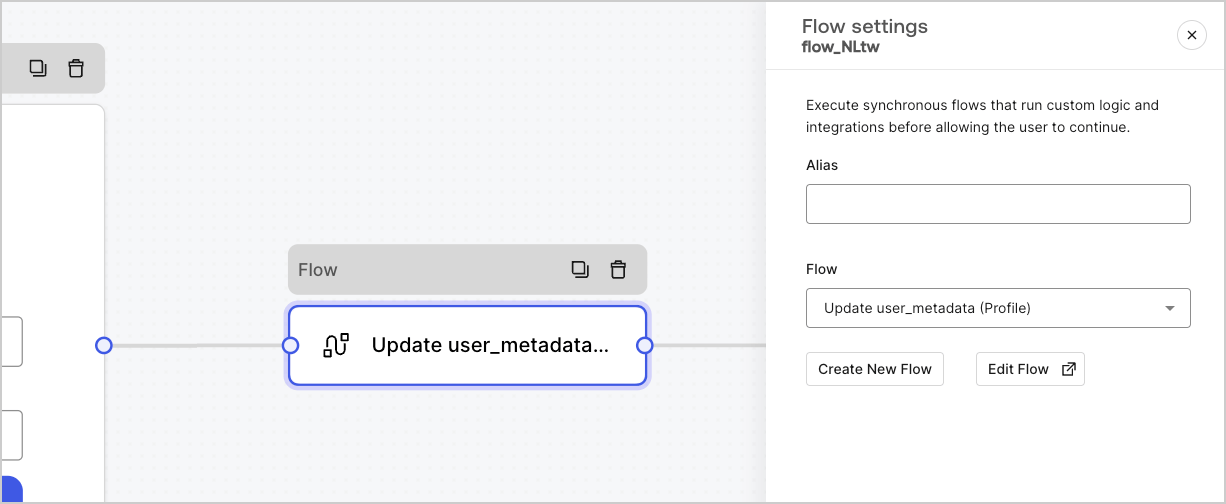
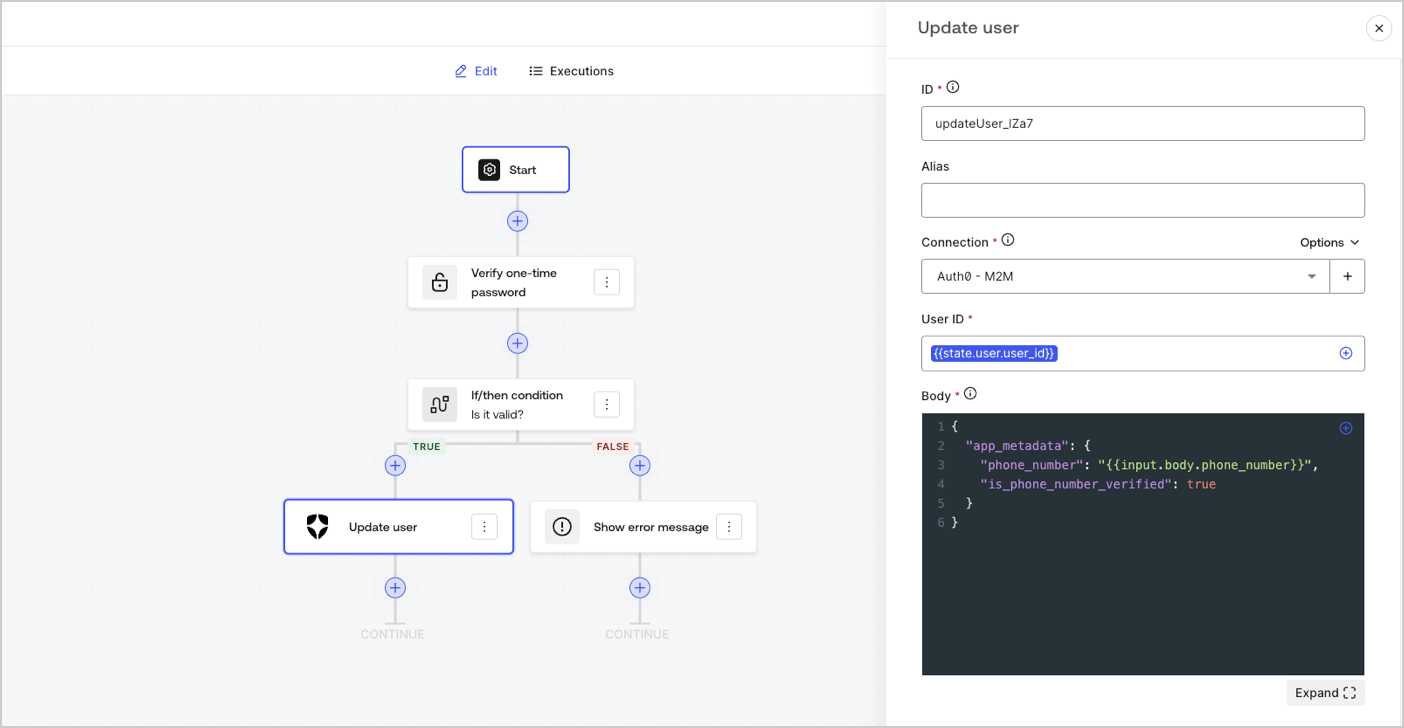
Les nœuds de flux vous permettent d’ajouter et de créer des logiques personnalisées et des flux d’intégration à vos formulaires. Pour en savoir plus, consultez [Flux](/docs/fr-ca/customize/forms/flows).
## Nœud de flux
Les nœuds de flux vous permettent d’ajouter et de créer des logiques personnalisées et des flux d’intégration à vos formulaires. Pour en savoir plus, consultez [Flux](/docs/fr-ca/customize/forms/flows).
 ## Nœud de départ
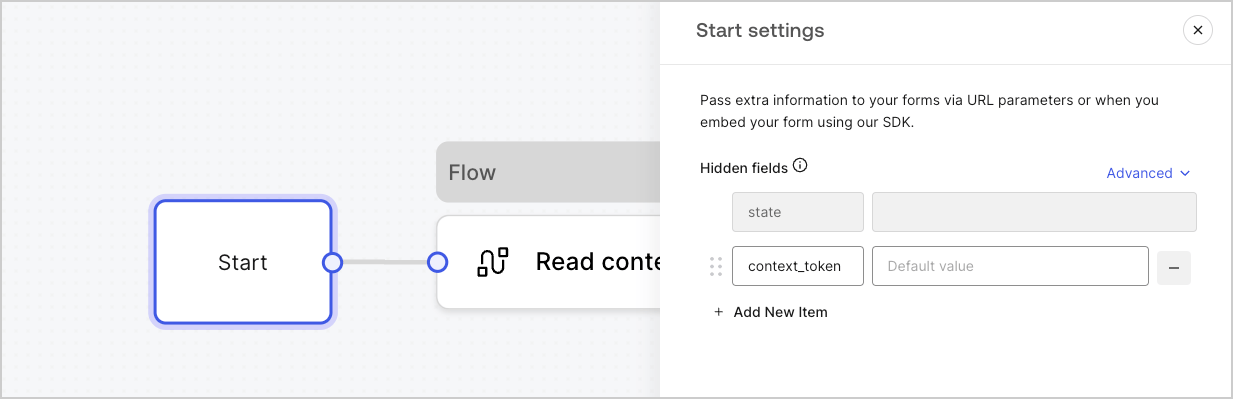
Les nœuds de départ ne sont pas visibles par l’utilisateur. C’est là que vous pouvez configurer des variables de champ cachées, telles que les attributs utilisateur lors du [rendu d’un formulaire avec une Action](/docs/fr-ca/customize/forms/render).
## Nœud de départ
Les nœuds de départ ne sont pas visibles par l’utilisateur. C’est là que vous pouvez configurer des variables de champ cachées, telles que les attributs utilisateur lors du [rendu d’un formulaire avec une Action](/docs/fr-ca/customize/forms/render).
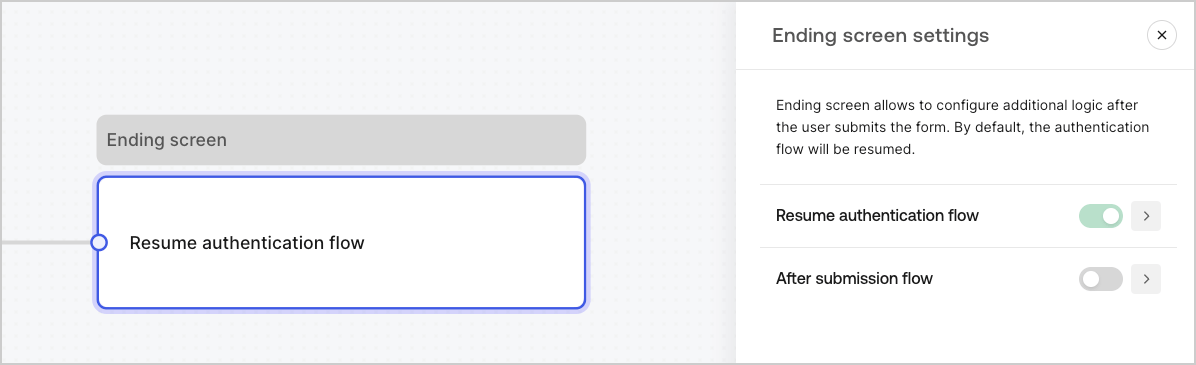
 ## Nœud d’écran de fin
Chaque formulaire dispose d’un nœud d’écran de fin. Par défaut, ce nœud reprend le flux d’authentification et c’est ici que vous pouvez configurer un flux post-soumission.
## Nœud d’écran de fin
Chaque formulaire dispose d’un nœud d’écran de fin. Par défaut, ce nœud reprend le flux d’authentification et c’est ici que vous pouvez configurer un flux post-soumission.